# Kurs - Vorbereitung

Dieses Kapitel gibt einen Überblick über alle Schritte, die vor Kursbeginn zu beachten sind. Ziel ist es, einen reibungslosen Ablauf sicherzustellen und eine Umgebung zu schaffen, in der die Kinder konzentriert und kreativ arbeiten können. Die folgenden Abschnitte erläutern die einzelnen Vorbereitungsschritte im Detail.

# Organisation

### Übersicht

### Materialen

<table border="1" id="bkmrk-kursplakat-calliope_" style="border-collapse: collapse; width: 100%; height: 58px;"><colgroup><col style="width: 23.452381%;"></col><col style="width: 35.47619%;"></col><col style="width: 41.071429%;"></col></colgroup><tbody><tr style="height: 29px;"><td style="height: 29px;">Kursplakat</td><td style="height: 29px;">[Calliope\_Kurs\_Plakat\_A2\_V02.00.pptx](https://calliope.codingkidz.de/wiki/attachments/93)

[Calliope\_Kurs\_Plakat\_A2\_V02.00.pdf](https://calliope.codingkidz.de/wiki/attachments/94)

</td><td style="height: 29px;">  
</td></tr><tr style="height: 29px;"><td style="height: 29px;">Coding Kidz </td><td style="height: 29px;">[codingkidz.de.png](https://calliope.codingkidz.de/wiki/attachments/96)

[codingkidz.de-Aufsteller-6.pdf](https://calliope.codingkidz.de/wiki/attachments/95)

[codingkidz.de-Aufsteller-16.pdf](https://calliope.codingkidz.de/wiki/attachments/97)

</td><td style="height: 29px;">  
</td></tr></tbody></table>

### Calliope mini / Calli:Bot

<table border="1" id="bkmrk-" style="border-collapse: collapse; width: 100%; height: 58px;"><colgroup><col style="width: 33.333333%;"></col><col style="width: 33.333333%;"></col><col style="width: 33.333333%;"></col></colgroup><tbody><tr style="height: 29px;"><td style="height: 29px;">  
</td><td style="height: 29px;">  
</td></tr><tr style="height: 29px;"><td style="height: 29px;">  
</td><td style="height: 29px;">  
</td></tr></tbody></table>

# Nutzer bei OpenRoberta anlegen

Damit die Schülerinnen und Schüler ihre Programmen abspeichern und wiederherstellen können, werden Nutzer-Accounts bei OpenRoberta benötigt. Diese sind vor dem zweiten Termin wie folgt anzulegen.

<table border="1" id="bkmrk-1.-anmeldung-bei-ope" style="border-collapse: collapse; width: 100%; height: 505px;"><colgroup><col style="width: 30.47619%;"></col><col style="width: 69.404762%;"></col></colgroup><tbody><tr style="height: 45px;"><td style="height: 45px;">Neuen Teilnehmenden anlegen

Muster:

Benutzername: evli-kurs-vorname

Passwort: evli-kurs

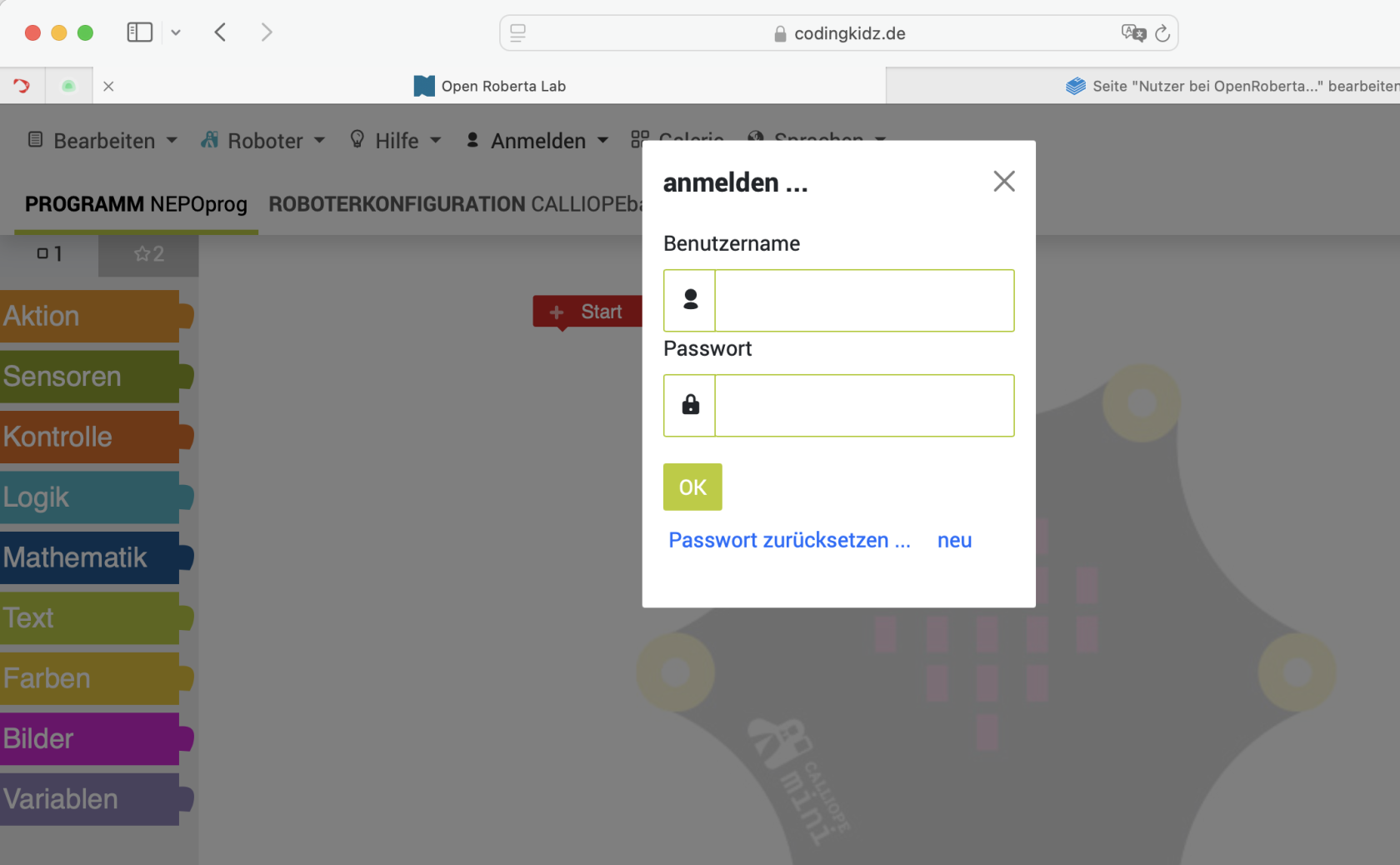
</td><td style="height: 45px;">Menu =&gt; Anmelden =&gt; anmelden

[![Bildschirmfoto 2024-11-17 um 11.33.46.png](https://calliope.codingkidz.de/wiki/uploads/images/gallery/2024-11/scaled-1680-/bildschirmfoto-2024-11-17-um-11-33-46.png)](https://calliope.codingkidz.de/wiki/uploads/images/gallery/2024-11/bildschirmfoto-2024-11-17-um-11-33-46.png)

Link "neu" anklicken

[![Bildschirmfoto 2024-11-17 um 11.34.51.png](https://calliope.codingkidz.de/wiki/uploads/images/gallery/2024-11/scaled-1680-/bildschirmfoto-2024-11-17-um-11-34-51.png)](https://calliope.codingkidz.de/wiki/uploads/images/gallery/2024-11/bildschirmfoto-2024-11-17-um-11-34-51.png)
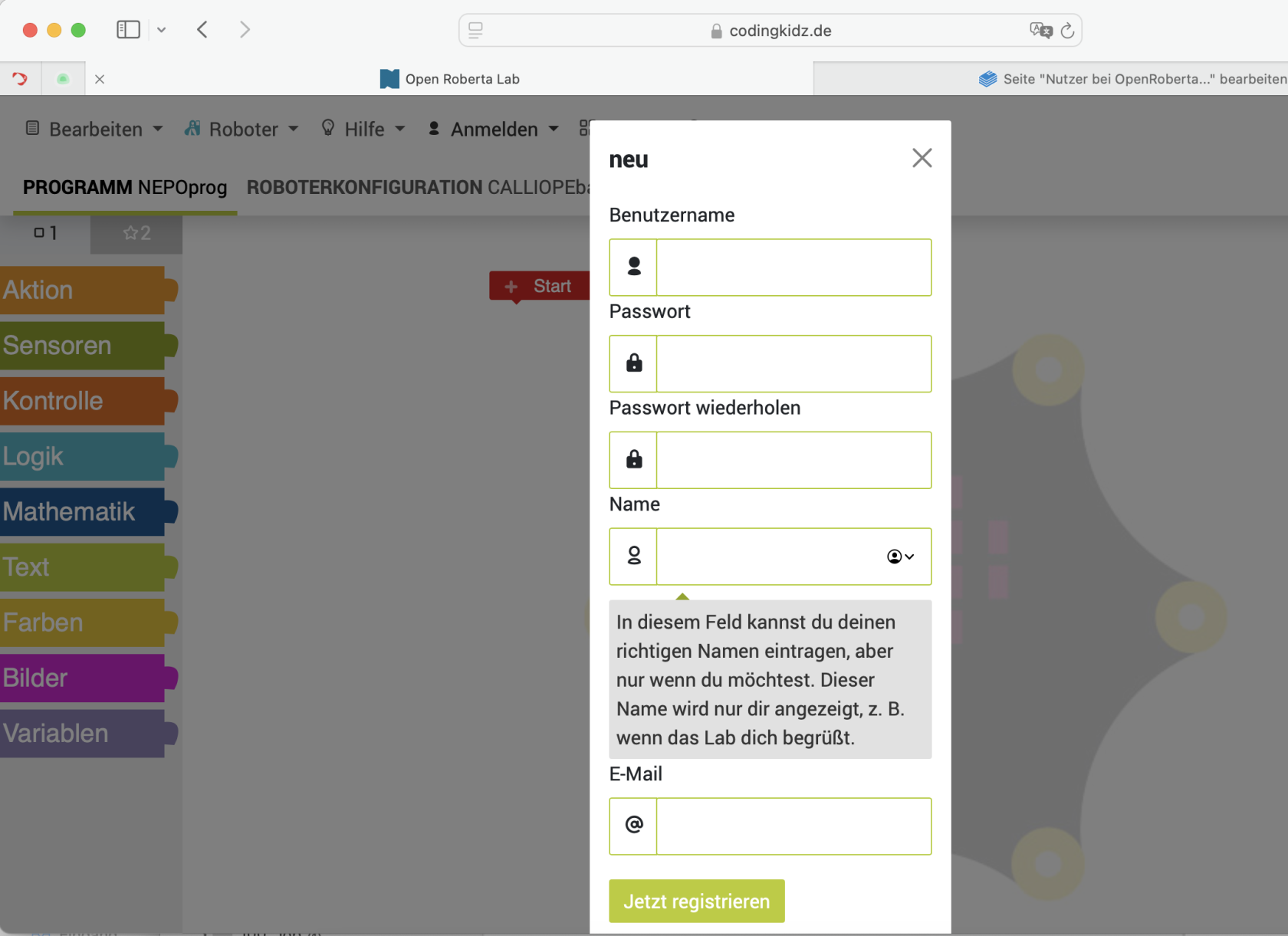
 Felder wie folgt ausfüllen:

- Benutzername: evli-kurs-vorname (bspw. evli-kurs-christian)
- Passwort: evli-kurs
- Passwort wiederholen: evli-kurs
- Name: Vorname des Teilnehmenden (bspw. Christian)
- E-Mail: nicht befüllen

</td></tr></tbody></table>

# Calliopes initialisieren

## Calliope

<table border="1" id="bkmrk-check-01%C2%A0-led-matrix" style="border-collapse: collapse; width: 100%;"><colgroup><col style="width: 50%;"></col><col style="width: 50%;"></col></colgroup><tbody><tr><td>Check 01

- LED Matrix
- RGB LED
- Töne

</td><td>[NEPOprog\_Calliope\_Check01.xml](https://calliope.codingkidz.de/wiki/attachments/16)

[NEPOprog\_Calliope\_Check01.hex](https://calliope.codingkidz.de/wiki/attachments/17)

</td></tr><tr><td>Check 02

</td><td>  
</td></tr></tbody></table>

## Calli:Bot

<table border="1" id="bkmrk-" style="border-collapse: collapse; width: 100%;"><colgroup><col style="width: 50%;"></col><col style="width: 50%;"></col></colgroup><tbody><tr><td>  
</td><td>  
</td></tr><tr><td>  
</td><td>  
</td></tr></tbody></table>